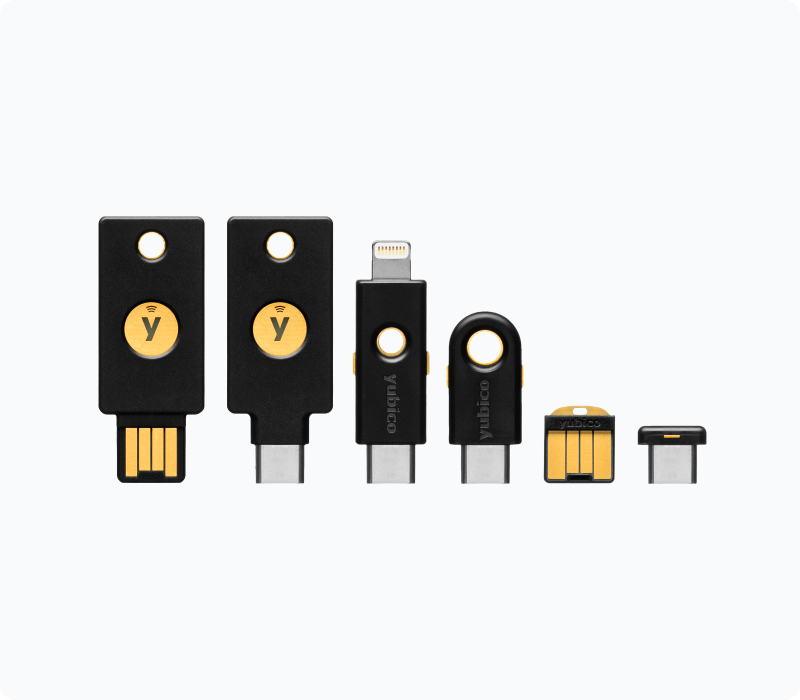
If you’ve ever felt a minor spike in anxiety waiting for a six-digit text message to log into your email, you aren’t alone. We’ve all been told that Multi-Factor Authentication (MFA) is essential for online security. But what if there was a faster, substantially more secure way to protect your accounts that didn’t rely on your phone at all?
Enter the hardware security key.
What is a YubiKey?
A YubiKey, manufactured by the company Yubico, is a small hardware security device that looks just like a standard USB thumb drive. Instead of storing files, it stores cryptographic keys.
When you log into a supported website, you enter your username and password. Then, instead of typing in a code from a text message or an authenticator app, you simply plug the YubiKey into your computer (or tap it against your phone via NFC) and physically touch the gold contact point on the key.
That single tap verifies your identity. It’s essentially a digital bouncer for your accounts that proves you are physically present at the device trying to log in.
Why Use a YubiKey? (The Problem with SMS)
Most people currently use text messages (SMS) or Authenticator apps (like Google Authenticator or Authy) for their two-factor authentication. While these are infinitely better than using nothing at all, they have vulnerabilities:
- SIM Swapping: Hackers can trick your mobile carrier into transferring your phone number to a SIM card they control. Once they have your number, they intercept all your SMS security codes.
- Phishing: If a hacker tricks you into visiting a fake website (like a site that looks exactly like the Google login page), they can steal both your password and the six-digit code you type in, using it to immediately log into the real site.
YubiKeys are practically immune to phishing. The key communicates directly with the web browser and verifies the actual URL of the site. If you are on a fake Google login page, the YubiKey recognizes the mismatch and flat-out refuses to hand over the authentication token.
3 Essential YubiKey Security Practices
If you’re ready to make the jump to hardware keys, there are a few best practices you need to follow so you don’t lock yourself out of your own life.
- Always Buy Two: This is the golden rule of hardware keys. You should have a primary key on your keychain for daily use, and a backup key stored securely in a fireproof safe or safety deposit box. If you lose your only key and have no backup authentication methods set up, you could be permanently locked out of your accounts.
- Set a PIN (FIDO2): For advanced accounts (like logging into your actual computer), modern YubiKeys support FIDO2, which allows for “passwordless” login. To use this securely, you set a local PIN on the key itself. If someone steals your keys, they still need the PIN to use them.
- Keep Your Authenticator App as a Backup (for now): Not every single website supports hardware keys yet. Keep your authenticator app installed for those stragglers, but prioritize your YubiKey for your most critical accounts (email, password managers, banking).
Where Can I Use a YubiKey?
Hardware key support is growing rapidly. You can use a YubiKey to lock down the most sensitive hubs of your digital life. Here are some of the major platforms that fully support them:
- Email & Ecosystems: Google (Gmail/Workspace), Microsoft Accounts (Outlook/Office 365), Apple ID.
- Password Managers: 1Password, Bitwarden, Dashlane, LastPass.
- Social & Communication: Twitter/X, Facebook, Discord.
- Developer & IT Tools: GitHub, GitLab, AWS, Cloudflare, Wasabi S3
- Crypto & Finance: Coinbase, Kraken, Binance, Vanguard.
I personally own 3 YubiKeys, and use them on a daily basis when authenticating to critical applications like Gmail, AWS, Office 365. I would recommend purchasing a Yubikey 5 series, since it supports a wide range of USB interfaces as well as NFC. NFC is the same technology used to purchase goods with your phone via Apple Wallet. This allows you to authenticate by holding the YubiKey close to your NFC reader.
Pro Tip: When setting up your YubiKey, start with your primary email account and your password manager. Those are the two “master keys” to your digital life; if they are locked down, everything else is substantially safer.
If you are interested in using a YubiKey with a specific application or service, let me know in the comments, and I will create a procedure explaining how to add a YubiKey to your chosen application. Keep in mind that not every application allows using YubiKeys for MFA, but nearly all of the big names in tech have implemented this capability. It’s just a matter of the specific steps you need to follow.